

- Posts: 6
- Thank you received: 0
process credit cards manually
15 years 9 months ago #2557
by smg
process credit cards manually was created by smg
Is it possible to have the credit card (or part of it) emailed to us manually? I know that in some software half of the credit card will be stored in a database, and the other half emailed. Is it possible to do this with the free (or paid) versions?
Thanks,
Mark
Thanks,
Mark
Please Log in or Create an account to join the conversation.

15 years 9 months ago #2565
by nicolas
Replied by nicolas on topic Re: process credit cards manually
There is no such option in HikaShop at the moment. The credit card is not processed within hikashop but on the payment processor website.
Please Log in or Create an account to join the conversation.
15 years 9 months ago #2588
by JIK
Replied by JIK on topic Re: process credit cards manually
IMHO, this would be a good addition to Hikashop. In Australia in particular, the merchant banks charge premium fees for online processing to counter the risks they associate with internet transactions. And the first question all of them will ask is whether your online system stores the cc number.
I run several Zen Cart shops that get around the problem by collecting the cc detail and then splitting the number into two parts. It sends the first and last 4 numbers to the store owner in one email, and the middle numbers in another email - or you can login to admin to get the middle numbers. The cc number is therefore not stored. It works very well for people who are integrating their online stores into a traditional business with an existing in-store merchant facility, and don't want to pay higher bank fees whilst they get their online stores humming along. Also, some don't want the expense of an SSL Certificate. Using PayPal is superb but their fees are high (or perceived so) especially for smaller or newer stores.
Virtuemart offers a Payment Processor for Eway which all Australian Banks and Amex ascribe to - this is about the only good thing I can say about Virtuemart!
With both Zen and VM, there is an ability to setup a cc facility directly between the store and the merchant bank. Some banks host the payment processor pages for the store (like PayPal) so everything to do with the payment is secure. NAB is a very good example and no SSL is required. Others, such as ANZ, provide the ability to link directly without them hosting the payment page but an SSL is required.
HikaShop is a tremendous leap forward for ecommerce integration into Joomla and I hope that future versions include such processors.
Just my 2 cents....
cheers!
I run several Zen Cart shops that get around the problem by collecting the cc detail and then splitting the number into two parts. It sends the first and last 4 numbers to the store owner in one email, and the middle numbers in another email - or you can login to admin to get the middle numbers. The cc number is therefore not stored. It works very well for people who are integrating their online stores into a traditional business with an existing in-store merchant facility, and don't want to pay higher bank fees whilst they get their online stores humming along. Also, some don't want the expense of an SSL Certificate. Using PayPal is superb but their fees are high (or perceived so) especially for smaller or newer stores.
Virtuemart offers a Payment Processor for Eway which all Australian Banks and Amex ascribe to - this is about the only good thing I can say about Virtuemart!
With both Zen and VM, there is an ability to setup a cc facility directly between the store and the merchant bank. Some banks host the payment processor pages for the store (like PayPal) so everything to do with the payment is secure. NAB is a very good example and no SSL is required. Others, such as ANZ, provide the ability to link directly without them hosting the payment page but an SSL is required.
HikaShop is a tremendous leap forward for ecommerce integration into Joomla and I hope that future versions include such processors.
Just my 2 cents....
cheers!
Please Log in or Create an account to join the conversation.
15 years 9 months ago - 15 years 9 months ago #2589
by nicolas
Replied by nicolas on topic Re: process credit cards manually
We add all that to the todo list.
A payment plugin to collect the CC info, store parts of it and send the rest by email is something we could do in the short term. Payment plugins integrating to external payment processors can be done as well but that requires quite some time on our end. Alternatively, we propose an API for payment plugins so that any PHP developer can build his own payment plugin for HikaShop: www.hikashop.com/en/support/documentation/62.html
A payment plugin to collect the CC info, store parts of it and send the rest by email is something we could do in the short term. Payment plugins integrating to external payment processors can be done as well but that requires quite some time on our end. Alternatively, we propose an API for payment plugins so that any PHP developer can build his own payment plugin for HikaShop: www.hikashop.com/en/support/documentation/62.html
Last edit: 15 years 9 months ago by nicolas.
Please Log in or Create an account to join the conversation.
15 years 9 months ago #2591
by JIK
Replied by JIK on topic Re: process credit cards manually
That's great Nicolas and the short term solution would just about kill Zen Cart for me!
Also, please don't forget to add collection of the cc's CCV - the Australian Banks have a good reputation for security but some still rely on the old "see the card & verify the signature" process, or at least get the CCV if you don't! (their proxy for proof that the cc user actually has the card which IMO is fundamentally archaic)
In Oz we still have a bit of banking catch to do.
Keep up the good work,
cheers
Also, please don't forget to add collection of the cc's CCV - the Australian Banks have a good reputation for security but some still rely on the old "see the card & verify the signature" process, or at least get the CCV if you don't! (their proxy for proof that the cc user actually has the card which IMO is fundamentally archaic)
In Oz we still have a bit of banking catch to do.
Keep up the good work,
cheers
Please Log in or Create an account to join the conversation.
15 years 9 months ago #2695
by smg
Replied by smg on topic Re: process credit cards manually
yes! the short term solution would be great for me as well!
Please Log in or Create an account to join the conversation.
15 years 9 months ago #3081
by nicolas
Replied by nicolas on topic Re: process credit cards manually
Hi,
Such plugin has been added to the version 1.4.0 of HikaShop. Beware that we highly recommend you to have an SSL certificate (HTTPS on the checkout) on your server to securize the communication of the credit card information from the customer's computer to your website.
Such plugin has been added to the version 1.4.0 of HikaShop. Beware that we highly recommend you to have an SSL certificate (HTTPS on the checkout) on your server to securize the communication of the credit card information from the customer's computer to your website.
Please Log in or Create an account to join the conversation.
15 years 9 months ago #3097
by smg
Replied by smg on topic Re: process credit cards manually
Hi, I have installed this new version, and can see the last 8 numbers in the email that I receive, but cannot find the first 8 numbers anywhere? Also, does it not verify that the credit card is a valid number (and not expired) ?
Please Log in or Create an account to join the conversation.
15 years 9 months ago #3098
by nicolas
Replied by nicolas on topic Re: process credit cards manually
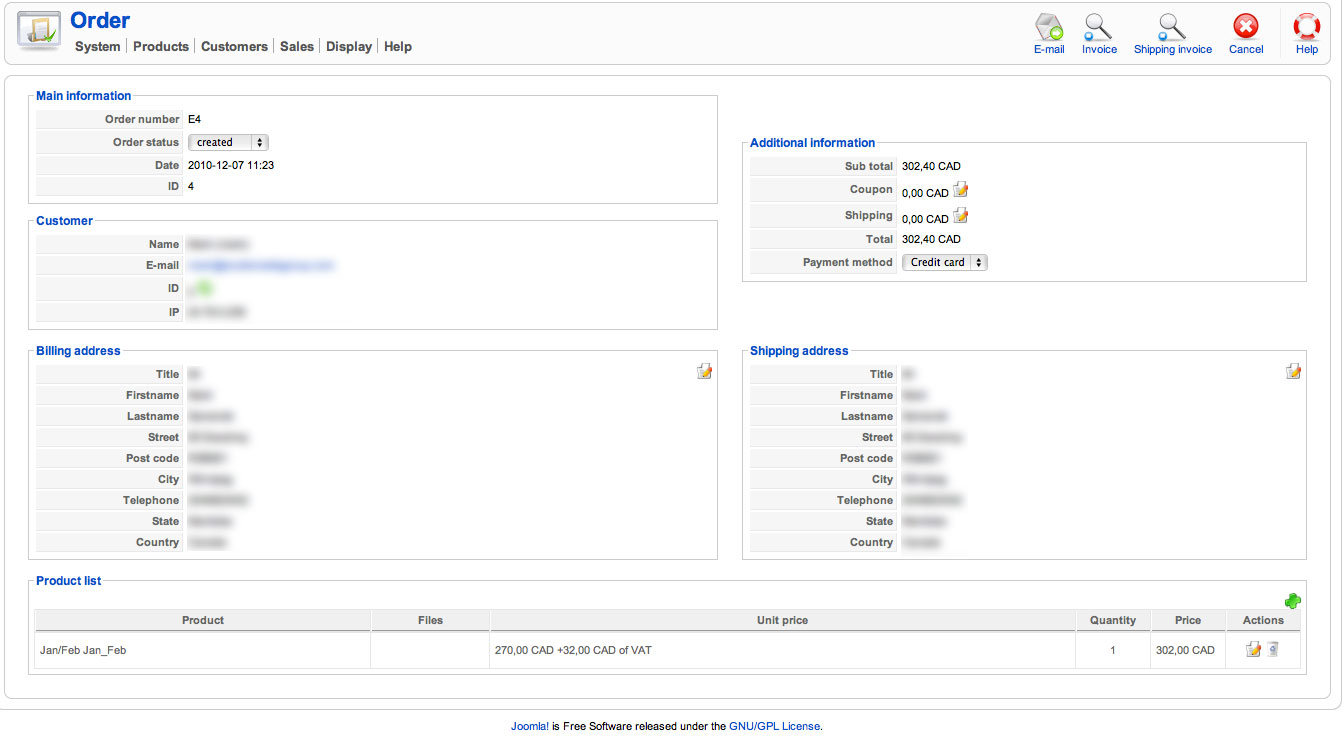
The rest of the information is in the order details (when you edit the order) in the history zone near the bottom.
The credit card number and date are indeed not checked at the moment. It's a first version
The credit card number and date are indeed not checked at the moment. It's a first version
Please Log in or Create an account to join the conversation.
15 years 9 months ago #3099
by smg
Replied by smg on topic Re: process credit cards manually
I do not see a history zone on the order details page. I only see what is in the attached image...
Please Log in or Create an account to join the conversation.
15 years 9 months ago #3100
by nicolas
Replied by nicolas on topic Re: process credit cards manually
It's probably because you deactivated the history plugin of HikaShop in the configuration. Could you activate it and try to do a new order ?
Please Log in or Create an account to join the conversation.
15 years 9 months ago #3101
by smg
Replied by smg on topic Re: process credit cards manually
It works now. Thanks for the extremely quick help/replies!
Please Log in or Create an account to join the conversation.
15 years 9 months ago #3112
by jpurch
Replied by jpurch on topic Re: process credit cards manually
I am new to HikaShop and wanted to know how the credit card details is actually processed. Once a user clicks submit, do the details get sent to a Joomla! database? Also, is there anyway to change this as I don't wish to store the information on the site. Or is this what was just discussed?
Thanks!
Thanks!
Please Log in or Create an account to join the conversation.
15 years 9 months ago #3117
by nicolas
Replied by nicolas on topic Re: process credit cards manually
The goal of this payment plugin is indeed to store the credit card information (half on the database and half in an email for security reasons) so that the store manager can process the transaction offline, either with his own payment terminal or via the phone with his bank. That is often possible when the store manager has a real store since he is already processing his customers credit cards in his real store. Then, when the transaction is done, he deletes immediately the credit card information.
If you want the transactions to be completed immediately and automatically, you need to setup one of the payment gateway plugins (paypal, moneybookers, authorize.net or bluepaid). The credit card information will be collected by the payment gateway and not stored in hikashop at all.
If you want the transactions to be completed immediately and automatically, you need to setup one of the payment gateway plugins (paypal, moneybookers, authorize.net or bluepaid). The credit card information will be collected by the payment gateway and not stored in hikashop at all.
Please Log in or Create an account to join the conversation.
15 years 8 months ago - 15 years 8 months ago #5033
by JIK
Replied by JIK on topic Re: process credit cards manually
A good enhancement to this would be to allow the input of a generic number (such as 1111222233334444) to acheive "sandbox" testing of the function. Can you explain how the cc number is validated as I have found that putting in anything other than an ACTUAL valid CC number produces an error? Very cool, but need something for testing purposes.
However,after entering the credit card details and hitting Next on the payment page:
My checkout workflow process is: login,payment_cart_confirm_fields,end
Using Hikashop Essentials 1.4.3
Please help!
cheers
However,after entering the credit card details and hitting Next on the payment page:
-
the Card Owners name is truncated to the first 4 letters
the card number shows only 15 numbers of the 16 digit number (the first 11 are X which is good), it should really show 16 digits with the first say 12 X'd out otherwise the buyer may get confused
But, most importantly, hitting the “next” button goes nowhere and there is no error message.
My checkout workflow process is: login,payment_cart_confirm_fields,end
Using Hikashop Essentials 1.4.3
Please help!
cheers
Last edit: 15 years 8 months ago by JIK.
Please Log in or Create an account to join the conversation.
15 years 8 months ago #5040
by nicolas
Replied by nicolas on topic Re: process credit cards manually
The credit card numbers are checked according to the mod10 algorithm which is used on cred card numbers:
www.azcode.com/Mod10/
You can use the credit card nubmers on that page when testing: www.darkcoding.net/credit-card-numbers/
These a fake credit card numbers but they match the algorithm.
For the owner name being truncated, that is a bug.
You can replace the code:
by:
in the file components/com_hikashop/controllers/checkout.php to fix the problem.
The number of X's is arbitrary. Actually, the number of digits in a credit card number varies which is why you might not get the good number of X's.
You can replace the code
by
in the file components/com_hikashop/views/checkout/tmpl/payment.php to generate the number of X dynamically based on the number of digits of the credit card used.
Concerning the next button, please check that your template is able to display error messages: www.hikashop.com/en/support/documentatio...tibility-issues.html
If that doesn't display any error message even with that, then could you give us the url of your website so that we could test your checkout ?
You can use the credit card nubmers on that page when testing: www.darkcoding.net/credit-card-numbers/
These a fake credit card numbers but they match the algorithm.
For the owner name being truncated, that is a bug.
You can replace the code:
Code:
$cc_owner=substr(preg_replace('#[^a-z ]#i','',$cc_owners[$payment.'_'.$payment_id]),0,4);
Code:
$cc_owner=preg_replace('#[^a-z ]#i','',$cc_owners[$payment.'_'.$payment_id]);
The number of X's is arbitrary. Actually, the number of digits in a credit card number varies which is why you might not get the good number of X's.
You can replace the code
Code:
"XXXXXXXXXXX"
Code:
str_repeat("X", strlen($cc_number)-4)
Concerning the next button, please check that your template is able to display error messages: www.hikashop.com/en/support/documentatio...tibility-issues.html
If that doesn't display any error message even with that, then could you give us the url of your website so that we could test your checkout ?
Please Log in or Create an account to join the conversation.
15 years 8 months ago #5143
by JIK
Replied by JIK on topic Re: process credit cards manually
Thanks for the tips on the credit card numbers - that's extremely useful
On the checkout not progressing I have checked the template and found the correct reference to <jdoc:include type="message" /> so that looks okay. It's an Artisteer template and it includes the reference correctly.
I have sent you a mail with the URL to my site - it is still in development and I don't want it on the forum.
Could you check it out for me?
Thanks!
On the checkout not progressing I have checked the template and found the correct reference to <jdoc:include type="message" /> so that looks okay. It's an Artisteer template and it includes the reference correctly.
I have sent you a mail with the URL to my site - it is still in development and I don't want it on the forum.
Could you check it out for me?
Thanks!
Please Log in or Create an account to join the conversation.
15 years 8 months ago #5172
by nicolas
Replied by nicolas on topic Re: process credit cards manually
There seems to be a problem in the checkout code when the owner option is activated.
Could you replace the line:
with the line:
in the file components/com_hikashop/controllers/checkout.php ?
That should solve the problem.
Could you replace the line:
Code:
$cc_owner = $app->getUserState( HIKASHOP_COMPONENT.'.cc_ownerV');
Code:
$cc_owner = $app->getUserState( HIKASHOP_COMPONENT.'.cc_owner');
That should solve the problem.
Please Log in or Create an account to join the conversation.
Less
More
- Posts: 28
- Thank you received: 0
15 years 8 months ago - 15 years 8 months ago #5230
by lakesentrance
Replied by lakesentrance on topic Re: process credit cards manually
I've just setup the Credit Card payment option.
I have paypal (of which I receive an email from Hika saying someone has placed an order_)
I have Bank Deposit (which I still DON'T receive an email from Hika saying anything, even tho the order is recorded in Sales)
I now have Credit Card, and still I don't receive an email from Hika when order is placed.
Also, I go into the Sale, and I have the History plugin there, but under the column of information I do NOT get any credit card details, but just this long line:
Tzo4OiJzdGRDbGFzcyI6Mzp7czo5OiJjY19udW1iZXIiO3M6ODoiNDQzNDYwMDAiO3M6ODoiY2NfbW9udGgiO3M6MjoiMDUiO3M6NzoiY2NfeWVhciI7czoyOiIxMiI7fQ==
So, my issue is still, no email for Bank Deposit, and no email for Credit Card - and no credit card number .... won't make much money this way ...
On a side note: the text under the payment screen, which changes when you change payment method, and click next ... it says "you have chosen to pay Paypal", ... how can I change the css (it's using the default templates standard body text) , to make it STAND OUT more (like in red and bold), so it doesn't seem like you've gone nowhere, and have to click Next again.
I have paypal (of which I receive an email from Hika saying someone has placed an order_)
I have Bank Deposit (which I still DON'T receive an email from Hika saying anything, even tho the order is recorded in Sales)
I now have Credit Card, and still I don't receive an email from Hika when order is placed.
Also, I go into the Sale, and I have the History plugin there, but under the column of information I do NOT get any credit card details, but just this long line:
Tzo4OiJzdGRDbGFzcyI6Mzp7czo5OiJjY19udW1iZXIiO3M6ODoiNDQzNDYwMDAiO3M6ODoiY2NfbW9udGgiO3M6MjoiMDUiO3M6NzoiY2NfeWVhciI7czoyOiIxMiI7fQ==
So, my issue is still, no email for Bank Deposit, and no email for Credit Card - and no credit card number ....
won't make much money this way ... On a side note: the text under the payment screen, which changes when you change payment method, and click next ... it says "you have chosen to pay Paypal", ... how can I change the css (it's using the default templates standard body text) , to make it STAND OUT more (like in red and bold), so it doesn't seem like you've gone nowhere, and have to click Next again.
Last edit: 15 years 8 months ago by lakesentrance. Reason: extra problem
Please Log in or Create an account to join the conversation.
15 years 8 months ago #5231
by nicolas
Replied by nicolas on topic Re: process credit cards manually
Yo won't be able to use the credit card payment plugin if you can't receive the emails properly as half of the credit card information is sent to you by email. What you're seeing there is the other half of the information. It's strange that it's not decoded when you display the order.
By any chances did you turn off the history plugin ? If so, could you activate it and try again ?
By any chances did you turn off the history plugin ? If so, could you activate it and try again ?
Please Log in or Create an account to join the conversation.
Time to create page: 0.348 seconds