
- Posts: 90
- Thank you received: 0
vat on invoice
- tanyatanya
-
 Topic Author
- Offline
Less
More
15 years 7 months ago #10907
by tanyatanya
vat on invoice was created by tanyatanya
hi,
I hope you can help. currently an invoice shows this:
price without VAT
subtotal
vat (on both item and shipping)
coupon
shipping (including VAT)
total
i need it to show this:
price without vat
subtotal
shipping (WITHOUT VAT)
vat (on both item and shipping)
coupon
total
any ideas?
Tanya
I hope you can help. currently an invoice shows this:
price without VAT
subtotal
vat (on both item and shipping)
coupon
shipping (including VAT)
total
i need it to show this:
price without vat
subtotal
shipping (WITHOUT VAT)
vat (on both item and shipping)
coupon
total
any ideas?
Tanya
Please Log in or Create an account to join the conversation.

15 years 7 months ago #10929
by nicolas
Replied by nicolas on topic Re: vat on invoice
Hi Tanya,
You can edit the invoices via the menu Display->Views. For the invoice on the backend, you can search for the file invoice of the view order and then edit its code to your needs.
You can edit the invoices via the menu Display->Views. For the invoice on the backend, you can search for the file invoice of the view order and then edit its code to your needs.
Please Log in or Create an account to join the conversation.
- tanyatanya
-
Topic Author
- Offline
Less
More
- Posts: 90
- Thank you received: 0
15 years 7 months ago #10992
by tanyatanya
Replied by tanyatanya on topic Re: vat on invoice
thank you for your reply.
do you know the code for shipping without vat?
do you know the code for shipping without vat?
Please Log in or Create an account to join the conversation.
15 years 7 months ago #10999
by nicolas
Replied by nicolas on topic Re: vat on invoice
The shipping price without VAT is not stored in the order information. You only have the total with VAT, the shipping with VAT, the unit price without VAT and the VAT of each product.
Please Log in or Create an account to join the conversation.
- tanyatanya
-
Topic Author
- Offline
Less
More
- Posts: 90
- Thank you received: 0
15 years 7 months ago #11008
by tanyatanya
Replied by tanyatanya on topic Re: vat on invoice
hi,
ok. how do i show the full vat (on both shipping and product). currently it just shows vat seperately for the product.
ok. how do i show the full vat (on both shipping and product). currently it just shows vat seperately for the product.
Please Log in or Create an account to join the conversation.
15 years 7 months ago #11014
by nicolas
Replied by nicolas on topic Re: vat on invoice
You can show the full vat for products but the shipping VAT cannot be retrieved easily as the calculated information is not stored with the order. You would have to use the currency class functions to inject the order's information in the functions to get the un taxed vat price for shipping. Then you could sum it up with the products vat.
To show the full vat for products, you need to loop through the products and sum the vat...
$tax = 0;
foreach($this->order->products as $product){
$tax += $product->order_product_quantity*$product->order_product_tax;
}
echo $this->currencyHelper->format($tax,$this->order->order_currency_id);
To show the full vat for products, you need to loop through the products and sum the vat...
$tax = 0;
foreach($this->order->products as $product){
$tax += $product->order_product_quantity*$product->order_product_tax;
}
echo $this->currencyHelper->format($tax,$this->order->order_currency_id);
Please Log in or Create an account to join the conversation.

15 years 7 months ago #11049
by nomadal
Life is nice but is with somebody else
Replied by nomadal on topic Re: vat on invoice
How can exclude the phrase "VAT" since all the products in the store are with VAT.
Life is nice but is with somebody else
Please Log in or Create an account to join the conversation.
15 years 7 months ago #11052
by nicolas
Replied by nicolas on topic Re: vat on invoice
You can change all the texts in HikaShop by overriding the translation file via the interface in the config under the tab languages.
Please Log in or Create an account to join the conversation.
15 years 7 months ago #11076
by nomadal
Life is nice but is with somebody else
Replied by nomadal on topic Re: vat on invoice
Sorry i feel a bit bad :blush: What i have to change? :blush:
Life is nice but is with somebody else
Please Log in or Create an account to join the conversation.
15 years 7 months ago #11083
by nicolas
Replied by nicolas on topic Re: vat on invoice
Well, you can search in the translation file for the text VAT (via the search of your browser) and copy these lines in the override textarea and change the text to what you need.
Please Log in or Create an account to join the conversation.
15 years 7 months ago #11401
by sholloway
Replied by sholloway on topic Re: vat on invoice
Hi Nicolas,
This is something that you should look at for a future version as the way companies want to deal with tax and shipping varies greatly, and it would be helpful to be able to amend it from the admin console. However, this is not currently possible so we will need to help Tanya with this. Which php file generates the invoice and which lines should be altered to give the required presentation?
If it is not possible to amend it the way Tanya described in her original post then it would be acceptable to have it thus:
Products (inc VAT)
Shipping (inc VAT)
==================
Total
(inc £x.xx VAT)
Many thanks, in advance
Stephen
This is something that you should look at for a future version as the way companies want to deal with tax and shipping varies greatly, and it would be helpful to be able to amend it from the admin console. However, this is not currently possible so we will need to help Tanya with this. Which php file generates the invoice and which lines should be altered to give the required presentation?
If it is not possible to amend it the way Tanya described in her original post then it would be acceptable to have it thus:
Products (inc VAT)
Shipping (inc VAT)
==================
Total
(inc £x.xx VAT)
Many thanks, in advance
Stephen
Please Log in or Create an account to join the conversation.
15 years 7 months ago #11408
by nicolas
Replied by nicolas on topic Re: vat on invoice
In the latest version of HikaShop that we released yesterday, we added the information of the VAT for shipping and coupon so that you can calculate the total tax by summing the tax of each product in the order and these two. You will have to edit the invoice file of the view checkout via the menu Display->Views in order to do that. The file is mainly composed of HTML so you should quickly find which lines display what.
Please Log in or Create an account to join the conversation.
15 years 7 months ago #11539
by sholloway
Replied by sholloway on topic Re: vat on invoice
I can't see the invoice file in the checkout view of the displays menu. There is one in the order view, but it seems largely php.
Please Log in or Create an account to join the conversation.
15 years 7 months ago #11552
by nicolas
Replied by nicolas on topic Re: vat on invoice
Yes, I mean order, not checkout.
Please Log in or Create an account to join the conversation.
15 years 6 months ago #13015
by ctsang007
Replied by ctsang007 on topic Re: vat on invoice
Hi Nicolas,
In the latest version of HikaShop that we released yesterday, we added the information of the VAT for shipping and coupon so that you can calculate the total tax by summing the tax of each product in the order and these two. You will have to edit the invoice file of the view checkout via the menu Display->Views in order to do that. The file is mainly composed of HTML so you should quickly find which lines display what.
Sorry to be a bit slow here.... Can you explain what exactly should be changed in the invoice file? I would like to have the VAT of the coupon included in the total VAT amount.
I'm on version 1.4.8.
Thanks in advance.
In the latest version of HikaShop that we released yesterday, we added the information of the VAT for shipping and coupon so that you can calculate the total tax by summing the tax of each product in the order and these two. You will have to edit the invoice file of the view checkout via the menu Display->Views in order to do that. The file is mainly composed of HTML so you should quickly find which lines display what.
Sorry to be a bit slow here.... Can you explain what exactly should be changed in the invoice file? I would like to have the VAT of the coupon included in the total VAT amount.
I'm on version 1.4.8.
Thanks in advance.
Please Log in or Create an account to join the conversation.
15 years 6 months ago #13021
by nicolas
Replied by nicolas on topic Re: vat on invoice
In the invoice file you will find that line:
echo $this->currencyHelper->format($this->order->order_subtotal-$this->order->order_subtotal_no_vat,$this->order->order_currency_id);
that you can change to:
echo $this->currencyHelper->format($this->order->order_subtotal+$this->order->order_discount_tax+$this->order->order_shipping_tax-$this->order->order_subtotal_no_vat,$this->order->order_currency_id);
echo $this->currencyHelper->format($this->order->order_subtotal-$this->order->order_subtotal_no_vat,$this->order->order_currency_id);
that you can change to:
echo $this->currencyHelper->format($this->order->order_subtotal+$this->order->order_discount_tax+$this->order->order_shipping_tax-$this->order->order_subtotal_no_vat,$this->order->order_currency_id);
Please Log in or Create an account to join the conversation.
Less
More
- Posts: 1
- Thank you received: 0
15 years 6 months ago #14974
by hotelathome
Replied by hotelathome on topic Re: vat on invoice
I need help with taxes too, to configure it for Australia and it is causing all sorts of issues with paypal.
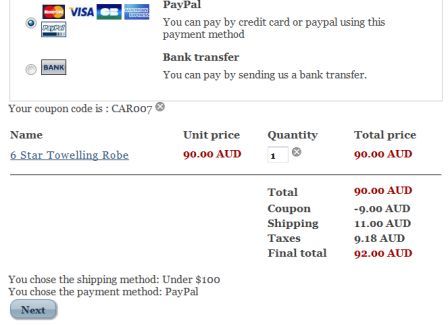
I need all prices to include GST (VAT) When a customer goes through the checkout it looks like this
PRODUCT PRICE $90(INC 10%TAX)
TOTAL $90(INC 10%TAX)
COUPON -$9 (INC 10%TAX)
SHIPPING $11 (INC 10% TAX)
TAXES $9.18 (TOTAL OF TAX ON SHIPPING AND ITEM, BUT NOT REDUCED BY DISCOUNT)
FINAL TOTAL $92.00 (INC 10% TAX)
A purchase of $92.00 would include 10% tax AND the actual tax should be $8.36 I tried twice, once with discount applied after taxes and discount applied before taxes and it still came up with the same incorrect tax amount.
Then when they are re-directed to paypal it looks like this:
UNIT PRICE $81.82(EXC TAX)
SHIPPING $11.00 (INC 10% TAX)
DISCOUNT -$9.00 (INC 10% TAX)
ITEM TOTAL $83.82 (A COMBINATION OF INCLUDE AND EXCLUDE 10% TAX)
SALES TAX $8.18
TOTAL $92.00 (CORRECT PRICE INC 10% TAX)
If a customer then clicks on the link in their email to look at their purchase it looks like this:
UNIT PRICE $81.82 (EXC 10% TAX)
TAX $8.18 (TAX ONLY ON ITEM - NOT ON SHIPPING OR COUPON)
COUPON -$9.00 (INC 10% TAX)
SHIPPING $11.00 (INC 10% TAX)
TOTAL $92.00 (INC 10% TAX)
I really need Paypal and the customer confirmation email link to look like the original checkout, with all prices including tax. But I need the tax amount to be correct too.
If you select, show prices with tax for the customer, then the paypal and the confirmation link should also show prices with tax too, I would have thought. I cannot find anyway of putting the tax code on the discounts either
I had this very same issue with Virtumart, and I was desperately hoping that your system would be able to cope with Australian GST rules.
Thanks,
Andrea
I need all prices to include GST (VAT) When a customer goes through the checkout it looks like this
PRODUCT PRICE $90(INC 10%TAX)
TOTAL $90(INC 10%TAX)
COUPON -$9 (INC 10%TAX)
SHIPPING $11 (INC 10% TAX)
TAXES $9.18 (TOTAL OF TAX ON SHIPPING AND ITEM, BUT NOT REDUCED BY DISCOUNT)
FINAL TOTAL $92.00 (INC 10% TAX)
A purchase of $92.00 would include 10% tax AND the actual tax should be $8.36 I tried twice, once with discount applied after taxes and discount applied before taxes and it still came up with the same incorrect tax amount.
Then when they are re-directed to paypal it looks like this:
UNIT PRICE $81.82(EXC TAX)
SHIPPING $11.00 (INC 10% TAX)
DISCOUNT -$9.00 (INC 10% TAX)
ITEM TOTAL $83.82 (A COMBINATION OF INCLUDE AND EXCLUDE 10% TAX)
SALES TAX $8.18
TOTAL $92.00 (CORRECT PRICE INC 10% TAX)
If a customer then clicks on the link in their email to look at their purchase it looks like this:
UNIT PRICE $81.82 (EXC 10% TAX)
TAX $8.18 (TAX ONLY ON ITEM - NOT ON SHIPPING OR COUPON)
COUPON -$9.00 (INC 10% TAX)
SHIPPING $11.00 (INC 10% TAX)
TOTAL $92.00 (INC 10% TAX)
I really need Paypal and the customer confirmation email link to look like the original checkout, with all prices including tax. But I need the tax amount to be correct too.
If you select, show prices with tax for the customer, then the paypal and the confirmation link should also show prices with tax too, I would have thought. I cannot find anyway of putting the tax code on the discounts either
I had this very same issue with Virtumart, and I was desperately hoping that your system would be able to cope with Australian GST rules.
Thanks,
Andrea
Please Log in or Create an account to join the conversation.
15 years 6 months ago #14984
by nicolas
Replied by nicolas on topic Re: vat on invoice
That's strange indeed.
We'll try to reproduce the problem on our end tomorrow and see if we have it and fix it.
We'll try to reproduce the problem on our end tomorrow and see if we have it and fix it.
Please Log in or Create an account to join the conversation.
15 years 6 months ago #15084
by nicolas
Replied by nicolas on topic Re: vat on invoice
Hi,
So first, here is the results for the first problem regarding the taxes calculated during the checkout:
The "discount applied before taxes" didn't had any effect in the calculations for coupons which is why you got $9.18 instead of $8,36. In order to fix that, you will have to change the line:
by:
in the function addCoupon of the file administrator/components/com_hikashop/classes/currency.php
That modification will be included in next release of HikaShop.
We will look at the other problems tomorrow as we have a lot of support to handle at the moment and these tests and debug take a lot of time on our end.
So first, here is the results for the first problem regarding the taxes calculated during the checkout:
The "discount applied before taxes" didn't had any effect in the calculations for coupons which is why you got $9.18 instead of $8,36. In order to fix that, you will have to change the line:
Code:
$discount->discount_value_without_tax = $discount->discount_percent_amount_calculated_without_tax = $discount->discount_percent_amount_calculated = round($price->price_value_with_tax*floatval($discount->discount_percent_amount)/100.0,$round);
by:
Code:
if($discount_before_tax){
$discount->discount_value_without_tax = $discount->discount_percent_amount_calculated_without_tax = $discount->discount_percent_amount_calculated = round($price->price_value*floatval($discount->discount_percent_amount)/100.0,$round);
$discount->discount_percent_amount_calculated = $price->price_value_with_tax*$discount->discount_percent_amount_calculated_without_tax/$price->price_value;
}else{
$discount->discount_value_without_tax = $discount->discount_percent_amount_calculated_without_tax = $discount->discount_percent_amount_calculated = round($price->price_value_with_tax*floatval($discount->discount_percent_amount)/100.0,$round);
}
in the function addCoupon of the file administrator/components/com_hikashop/classes/currency.php
That modification will be included in next release of HikaShop.
We will look at the other problems tomorrow as we have a lot of support to handle at the moment and these tests and debug take a lot of time on our end.
Please Log in or Create an account to join the conversation.
- tanyatanya
-
Topic Author
- Offline
Less
More
- Posts: 90
- Thank you received: 0
15 years 1 month ago - 15 years 1 month ago #26175
by tanyatanya
This attachment is hidden for guests.
I've got a couple of problems with my invoices - I've attached one to show you.
it shows the correct VAT figure (vat on both price and shipping), but the shipping figure is shown including VAT. shipping figure should be £0.83
how do I get it to show shipping without VAT?
also the invoice is missing some of the address details - its got the postcode but all the other info is missing - any ideas?
Replied by tanyatanya on topic Re: vat on invoice
This attachment is hidden for guests.
Please log in or register to see it.
it shows the correct VAT figure (vat on both price and shipping), but the shipping figure is shown including VAT. shipping figure should be £0.83
how do I get it to show shipping without VAT?
also the invoice is missing some of the address details - its got the postcode but all the other info is missing - any ideas?
Last edit: 15 years 1 month ago by tanyatanya.
Please Log in or Create an account to join the conversation.
Time to create page: 0.164 seconds