

- Posts: 251
- Thank you received: 2
Translate Custom Field
14 years 11 months ago #27814
by Nello
Translate Custom Field was created by Nello
Hi Nicolas,
I have a custom field in product page I added using this code in the view->product->show
if(!empty($this->element->CUSTOM_FIELD_COLUMN_NAME)){
$document =& JFactory::getDocument();
$document->setTitle( $this->element->CUSTOM_FIELD_COLUMN_NAME );
}
All works well! I have my custom title for each product.
The question is how to translate this field using directly the translation tab in the product page in the back-end.
I hope I was clear.
Thank you!
I have a custom field in product page I added using this code in the view->product->show
if(!empty($this->element->CUSTOM_FIELD_COLUMN_NAME)){
$document =& JFactory::getDocument();
$document->setTitle( $this->element->CUSTOM_FIELD_COLUMN_NAME );
}
All works well! I have my custom title for each product.
The question is how to translate this field using directly the translation tab in the product page in the back-end.
I hope I was clear.
Thank you!
Please Log in or Create an account to join the conversation.

14 years 11 months ago #27827
by nicolas
Replied by nicolas on topic Re: Translate Custom Field
Hi,
You can use joomfish to translate the custom field via the joomfish interface. You just have to edit the contentelement xml file of the product table ( administrator/components/com_joomfish/contentelements/hikashop_product.xml ) and add your custom field and then you will be able to translate it via joomfish's interface.
However, to do that directly via the edition page of products in HikaShop would require that you change the code at several places. It's not a small change...
You can use joomfish to translate the custom field via the joomfish interface. You just have to edit the contentelement xml file of the product table ( administrator/components/com_joomfish/contentelements/hikashop_product.xml ) and add your custom field and then you will be able to translate it via joomfish's interface.
However, to do that directly via the edition page of products in HikaShop would require that you change the code at several places. It's not a small change...
Please Log in or Create an account to join the conversation.
14 years 11 months ago #27835
by Nello
Replied by Nello on topic Re: Translate Custom Field
Ah Ok but I already do this.
I thought it was possible to use the panel in the product tab, like in the pic attached.
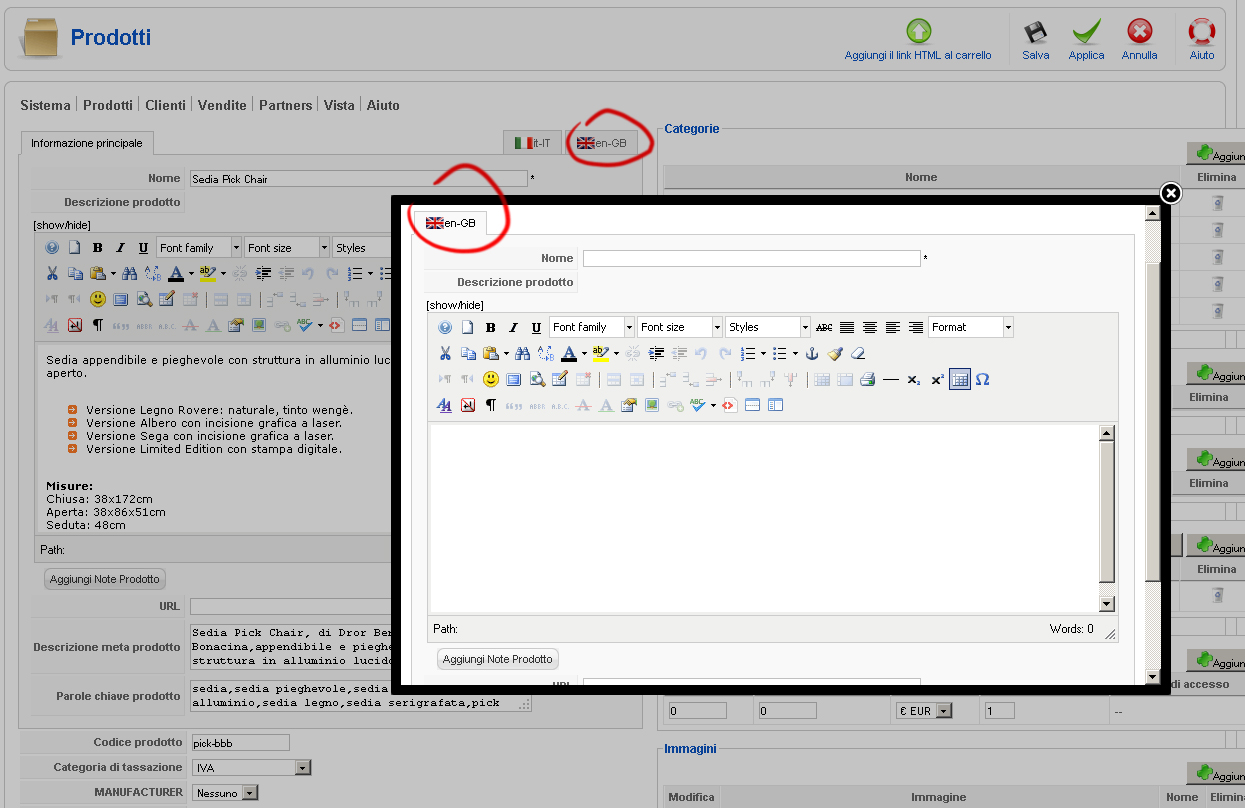
I thought it was possible to use the panel in the product tab, like in the pic attached.
Please Log in or Create an account to join the conversation.
14 years 11 months ago #27837
by nicolas
Replied by nicolas on topic Re: Translate Custom Field
No, that would require to modify the views there to handle that, as well as an option on custom fields to select whether it is translatable or not.
It would be possible to add that of course, but it's not possible right now.
It would be possible to add that of course, but it's not possible right now.
Please Log in or Create an account to join the conversation.
14 years 11 months ago #27843
by Nello
Replied by Nello on topic Re: Translate Custom Field
OK! 
Thank you!
Thank you!
Please Log in or Create an account to join the conversation.
Time to create page: 0.170 seconds