

- Posts: 87
- Thank you received: 2
VAT calculation method
15 years 7 months ago #8897
by agrfoto
VAT calculation method was created by agrfoto
I'd like clarification that I have understood correctly in setting up the shop for VAT calculations, depending on the type of user and Eurozone country.
The shop is based in Italy, therefore I have to add VAT (Iva) to all sales within Italy and also to individuals and companies that do NOT have VAT numbers in other European countries.
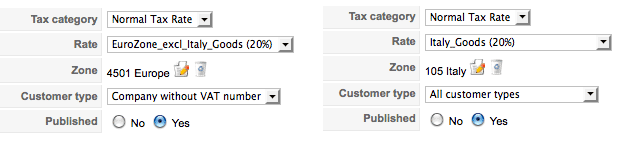
I have set up two Tax Rules (config/system/taxes), as can be seen by the attachment, but do I need a third one for Company with VAT number?
When a user goes to the checkout and registers his/her address, they have the option to fill in the company field and VAT number field.
- If these two fields are NOT filled in by the user then they will have VAT added in the cart, in any Eurozone country including Italy.
- If they fill in the company field but NOT the VAT number field they too will have the VAT added to the total.
- If however they fill in both the company field and VAT number field then the VAT will NOT be added to the order.
Am I correct so far?
The reason I ask is that the following quote is taken from another thread which seems to be saying the opposite about companies with or without VAT.
Additionally I have activated the VAT number check in Config/Main set to check format.
If the address of the user is Germany (for example) and the number they enter is NOT valid does it give an error message to the user or merely ignore it and treat the order as an individual and add the VAT to the order?
And what happens when someone fills in the VAT number bit NOT the Company number? Does it take their name as the compny name? I have these two form fields set to NOT regquired as not all customers will be companies.
The shop is based in Italy, therefore I have to add VAT (Iva) to all sales within Italy and also to individuals and companies that do NOT have VAT numbers in other European countries.
I have set up two Tax Rules (config/system/taxes), as can be seen by the attachment, but do I need a third one for Company with VAT number?
When a user goes to the checkout and registers his/her address, they have the option to fill in the company field and VAT number field.
- If these two fields are NOT filled in by the user then they will have VAT added in the cart, in any Eurozone country including Italy.
- If they fill in the company field but NOT the VAT number field they too will have the VAT added to the total.
- If however they fill in both the company field and VAT number field then the VAT will NOT be added to the order.
Am I correct so far?
The reason I ask is that the following quote is taken from another thread which seems to be saying the opposite about companies with or without VAT.
"The individual will be considered as a company with VAT if he fills the company field. If he fills the VAT number field, he will be considered as a company without VAT."
Additionally I have activated the VAT number check in Config/Main set to check format.
If the address of the user is Germany (for example) and the number they enter is NOT valid does it give an error message to the user or merely ignore it and treat the order as an individual and add the VAT to the order?
And what happens when someone fills in the VAT number bit NOT the Company number? Does it take their name as the compny name? I have these two form fields set to NOT regquired as not all customers will be companies.
Please Log in or Create an account to join the conversation.

15 years 7 months ago #8923
by nicolas
Replied by nicolas on topic Re: VAT calculation method
You're missing a third rule so that individuals within europe are taxed which should not be the case with your current settings.
You're correct.
It will display an error message saying that the VAT number is invalid, cancel the operation, and display again the form.
As long as the VAT number is valid the user will be considered as a "company with VAT number".
You're correct.
It will display an error message saying that the VAT number is invalid, cancel the operation, and display again the form.
As long as the VAT number is valid the user will be considered as a "company with VAT number".
Please Log in or Create an account to join the conversation.
15 years 7 months ago #8935
by agrfoto
Replied by agrfoto on topic Re: VAT calculation method
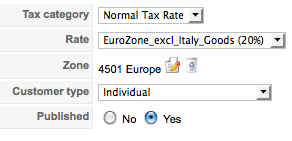
OK, I've added that.
However, with my test guest account (German individual), the cart is showing the price without tax of 20.00 when it should be 24.00.
I left the Company field and VAT number field empty.
Screenshot in next post..
However, with my test guest account (German individual), the cart is showing the price without tax of 20.00 when it should be 24.00.
I left the Company field and VAT number field empty.
Screenshot in next post..
Please Log in or Create an account to join the conversation.
15 years 7 months ago #8936
by agrfoto
Replied by agrfoto on topic Re: VAT calculation method
shopping cart (dummy guest)

Please Log in or Create an account to join the conversation.
15 years 7 months ago #8938
by nicolas
Replied by nicolas on topic Re: VAT calculation method
What is your "Default address type" set to in the config ? It should be individual.
Please Log in or Create an account to join the conversation.
15 years 7 months ago #8940
by agrfoto
Replied by agrfoto on topic Re: VAT calculation method
That's it! I had it set to All Customer Types.
I though perhaps I needed a fourth rule for comapnies with Vat number (set to 0%)
Thanks again for clearing that up.
I though perhaps I needed a fourth rule for comapnies with Vat number (set to 0%)
Thanks again for clearing that up.
Please Log in or Create an account to join the conversation.
15 years 7 months ago #8941
by nicolas
Replied by nicolas on topic Re: VAT calculation method
If no rules match to the current situation, no taxes are applied. Thus, you don't need 0% tax rules
Please Log in or Create an account to join the conversation.
15 years 7 months ago #8942
by agrfoto
Replied by agrfoto on topic Re: VAT calculation method
Yes, I get that now, thanks for clarifying!
Now I need to go shopping on your site
Now I need to go shopping on your site
Please Log in or Create an account to join the conversation.
Less
More
- Posts: 6
- Thank you received: 0
14 years 7 months ago #41752
by customcraftcomputers
Replied by customcraftcomputers on topic Re: VAT calculation method
I realize that this software is built in the UK but I am having difficulties setting up Taxes for the website. See in the US, no one buying outside of my state has to pay a sales tax. My state is MO, but I can only choose a Zone based on Country and not state. Is there any way to only charge sales tax to those who buy from me within my own state?
Please Log in or Create an account to join the conversation.
14 years 7 months ago #41876
by nicolas
Replied by nicolas on topic Re: VAT calculation method
HikaShop is built in France actually but sure, you can do that.
In your tax rule, you can choose a zone for the tax rule. At the moment you must have the USA in it. But if you set it to your state instead, it will only apply when the user address is in your state.
In your tax rule, you can choose a zone for the tax rule. At the moment you must have the USA in it. But if you set it to your state instead, it will only apply when the user address is in your state.
Please Log in or Create an account to join the conversation.
11 years 1 month ago - 11 years 1 month ago #213406
by hactic
Replied by hactic on topic Re: VAT calculation method
In user registration, I am not asked for user type (individual vs. business) or VAT number.
How can I enable that?
"Default address type" is set to "All customer types", "VAT number check" is set to "Online check".
How can I enable that?
"Default address type" is set to "All customer types", "VAT number check" is set to "Online check".
Last edit: 11 years 1 month ago by hactic.
Please Log in or Create an account to join the conversation.
11 years 1 month ago #213420
by nicolas
Replied by nicolas on topic Re: VAT calculation method
Hi,
You should keep the "default address type" setting to "individual".
Then, you want to enable the "address_company" and "address_vat" fields via the menu Display>Custom fields.
You should keep the "default address type" setting to "individual".
Then, you want to enable the "address_company" and "address_vat" fields via the menu Display>Custom fields.
The following user(s) said Thank You: hactic
Please Log in or Create an account to join the conversation.
Time to create page: 0.234 seconds