

- Posts: 33
- Thank you received: 0
You can talk here in German about HikaShop. Please understand that we do not speak German at HikaShop and we can't offer support in German.
Verwandte Produkte
15 years 4 months ago #18126
by hi0815
Verwandte Produkte was created by hi0815
Hallo,
Ich habe im Shop die Optionsfelder und die Möglichkeit "Verwandte Produkte" beizufügen.
Aber wo werden diese dann Angezeigt?
Nach meinem Testen finde ich keine Veränderung und weitere zugehörige Produkte.
Ich habe im Shop die Optionsfelder und die Möglichkeit "Verwandte Produkte" beizufügen.
Aber wo werden diese dann Angezeigt?
Nach meinem Testen finde ich keine Veränderung und weitere zugehörige Produkte.
Please Log in or Create an account to join the conversation.

15 years 4 months ago #18149
by nicolas
Replied by nicolas on topic Re: Verwandte Produkte
You need to create a new module of the type hikashop content module via the joomla manager and, in the hikashop options of the module, you need to make it display related products on the product page.
Then, you can leave it unpublished, and make it published, in the "modules under the product page" option of the Display tab of the configuration of HikaShop.
Then, you can leave it unpublished, and make it published, in the "modules under the product page" option of the Display tab of the configuration of HikaShop.
Please Log in or Create an account to join the conversation.
15 years 4 months ago #18216
by hi0815
Replied by hi0815 on topic Re: Verwandte Produkte
Hallo Nicolas,
Supi,Ich habe ein neues Modul "..meme categorie" erstellt und dies funktioniert mit den gleichen Artikel der Kategorie
Die Funktionen auf <Module auf der Produktseite> "Auswahl" um diese zu Aktivieren war gut versteckt
Leider verstehe/finde ich nicht ganz wie ich in der Katalog-Ansicht das erstellte Modul ausblenden kann da dies ja dann doppelt angezeigt wird.
Ich hoffe du verstehst was ich meine, sonst mache ich noch ein Screenshot..
Supi,Ich habe ein neues Modul "..meme categorie" erstellt und dies funktioniert mit den gleichen Artikel der Kategorie
Die Funktionen auf <Module auf der Produktseite> "Auswahl" um diese zu Aktivieren war gut versteckt
Leider verstehe/finde ich nicht ganz wie ich in der Katalog-Ansicht das erstellte Modul ausblenden kann da dies ja dann doppelt angezeigt wird.
Ich hoffe du verstehst was ich meine, sonst mache ich noch ein Screenshot..
Please Log in or Create an account to join the conversation.
15 years 4 months ago #18217
by nicolas
Replied by nicolas on topic Re: Verwandte Produkte
I don't understand. The translation from Google Translate is too messy.
Please Log in or Create an account to join the conversation.
15 years 4 months ago #18280
by hi0815
Replied by hi0815 on topic Re: Verwandte Produkte
I have the same problem, I ask the question again in French
l´installation a fonctionné merci! mais dans la catégorie il y a aussi le deuxième module avec la "...même catégorie"
comment je peut désactivé ce module sur la page "Catalogue" ?
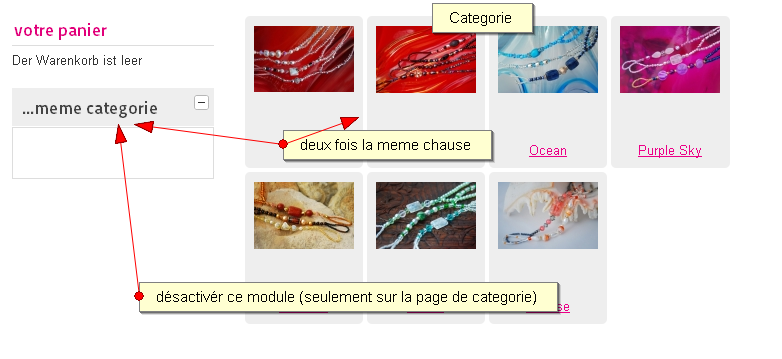
l´installation a fonctionné merci! mais dans la catégorie il y a aussi le deuxième module avec la "...même catégorie"
comment je peut désactivé ce module sur la page "Catalogue" ?
Please Log in or Create an account to join the conversation.
15 years 4 months ago #18285
by nicolas
Replied by nicolas on topic Re: Verwandte Produkte
In the module's options (that you can find via the joomla module manager) you can assign the module to only some pages. So you should remove that module from the categories listing page if you don't want to display it there.
Please Log in or Create an account to join the conversation.
15 years 4 months ago - 15 years 4 months ago #18295
by hi0815
Replied by hi0815 on topic Re: Verwandte Produkte
Sorry, Logisch wäre das, aber ich kann keine weiter Optionen/Einstellungen im Modul "meme categorie" finden?!
Ich glaube da ist noch ein anderes Problem.
In der Menüzuweisung wird das Modul nur angezeigt wenn ich es wie auf dem Bild zu sehen im Hauptmenü verlinkt "Oben" Aktiviere.
Alle andere Aktivierungen haben keine Auswirkung auf das Modul und das Modul wird dann auch nicht angezeigt :huh:
Schade daß im Deutschsprachigem Forum keine weitere User sich melden
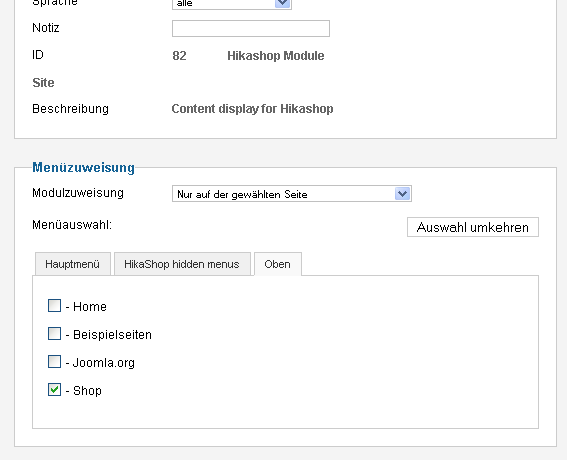
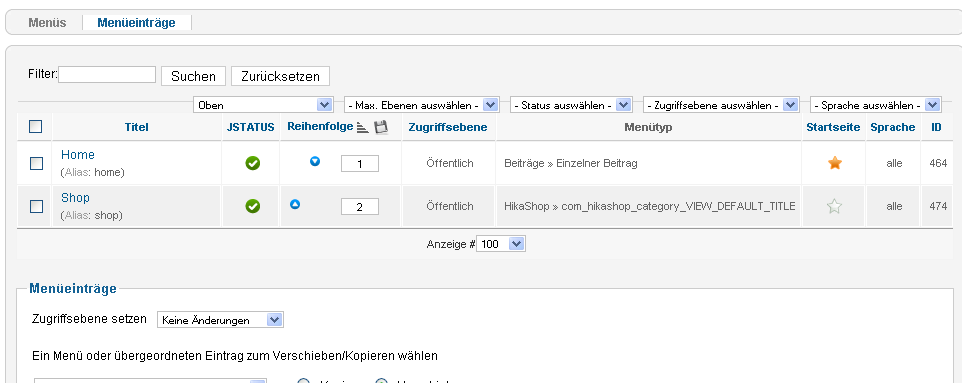
Ich glaube da ist noch ein anderes Problem.
In der Menüzuweisung wird das Modul nur angezeigt wenn ich es wie auf dem Bild zu sehen im Hauptmenü verlinkt "Oben" Aktiviere.
Alle andere Aktivierungen haben keine Auswirkung auf das Modul und das Modul wird dann auch nicht angezeigt :huh:
Schade daß im Deutschsprachigem Forum keine weitere User sich melden
Last edit: 15 years 4 months ago by hi0815.
Please Log in or Create an account to join the conversation.
15 years 4 months ago #18306
by nicolas
Replied by nicolas on topic Re: Verwandte Produkte
Could you give a link to your website so that we can see the problem ?
Please Log in or Create an account to join the conversation.
15 years 4 months ago #18314
by hi0815
Replied by hi0815 on topic Re: Verwandte Produkte
Jo,
Hier
Please Log in or Create an account to join the conversation.
15 years 4 months ago #18354
by nicolas
Replied by nicolas on topic Re: Verwandte Produkte
Your website is not working. I can't access it.
Please Log in or Create an account to join the conversation.
15 years 4 months ago #18359
by hi0815
Replied by hi0815 on topic Re: Verwandte Produkte
Komisch bei mir geht es, ich Arbeite schon den Ganzen Tag daran "It works"
Please Log in or Create an account to join the conversation.
15 years 4 months ago #18371
by nicolas
Replied by nicolas on topic Re: Verwandte Produkte
It's working now.
So I understand that you want to deactivate the module on the shop's first page as it's not displaying anything but that you want it displayed on the other pages of the shop. That's actually not possible with the way it's done.
There would be a solution though:
activate the loadposition plugin of joomla
Move your current shop menu in the hidden main menu
create a new module of the type hikashop content module which would display a listing of the categories like you have on your current shop page. Set it's "menu" option to your shop menu
create a new joomla article and include that module using a loadposition tag ( docs.joomla.org/How_do_you_put_a_module_inside_an_article%3F )
create a new shop menu which would link to that article.
In your "meme categorie" module, you will have two shop menus. If you remove the assignment to the new shop menu you created, you won't see it on the first page but you will see it on other pages.
So I understand that you want to deactivate the module on the shop's first page as it's not displaying anything but that you want it displayed on the other pages of the shop. That's actually not possible with the way it's done.
There would be a solution though:
activate the loadposition plugin of joomla
Move your current shop menu in the hidden main menu
create a new module of the type hikashop content module which would display a listing of the categories like you have on your current shop page. Set it's "menu" option to your shop menu
create a new joomla article and include that module using a loadposition tag ( docs.joomla.org/How_do_you_put_a_module_inside_an_article%3F )
create a new shop menu which would link to that article.
In your "meme categorie" module, you will have two shop menus. If you remove the assignment to the new shop menu you created, you won't see it on the first page but you will see it on other pages.
Please Log in or Create an account to join the conversation.
Time to create page: 0.130 seconds